
The California DE-4 form controls how much state income tax your employer withholds from each paycheck. Most new employees complete it correctly in 5 to 10 minutes by filling out only the worksheets that match their situation. Use our California paycheck calculator to see how your allowance choices affect your take-home pay in real time.
Eight years ago I submitted mine wrong on my first day and my paycheck came up short. That one mistake, and the hours I spent fixing it with HR, is why this guide covers every scenario the EDD form actually asks about.
One warning: copying your federal W-4 answers onto the DE-4 almost always causes under-withholding. The two forms use different calculations entirely.
Here is the fastest answer based on your situation:
- Single, one job, no dependents: Claim 1 allowance on Worksheet A. Skip B and C. Sign and submit.
- Married, one income: Claim allowances for yourself, spouse, and dependents on Worksheet A. Skip B and C.
- Multiple jobs or side income: Complete Worksheet A plus Worksheet C. Add extra withholding per paycheck.
Which Worksheet Do You Actually Need? (Fast Decision Tree)
The DE-4 has three worksheets. Most people only need one or two. Here is exactly what applies to you.
Single, One Job, No Dependents
You need Worksheet A only. Skip Worksheets B and C completely. This is the fastest path to finishing the form.
Married With a Spouse Who Also Works
You need Worksheet A. You should also review Worksheet C. Two incomes in one household can lead to under-withholding if you skip this step.
You Own a Home or You Itemize Deductions
Review Worksheet B. Mortgage interest and other big deductions change your withholding math. This worksheet helps you account for that.
You Have a Side Gig, Freelance Work, or Multiple Jobs
Go to Worksheet C. Extra income sources often lead to a surprise tax bill in April. Worksheet C helps you avoid that.
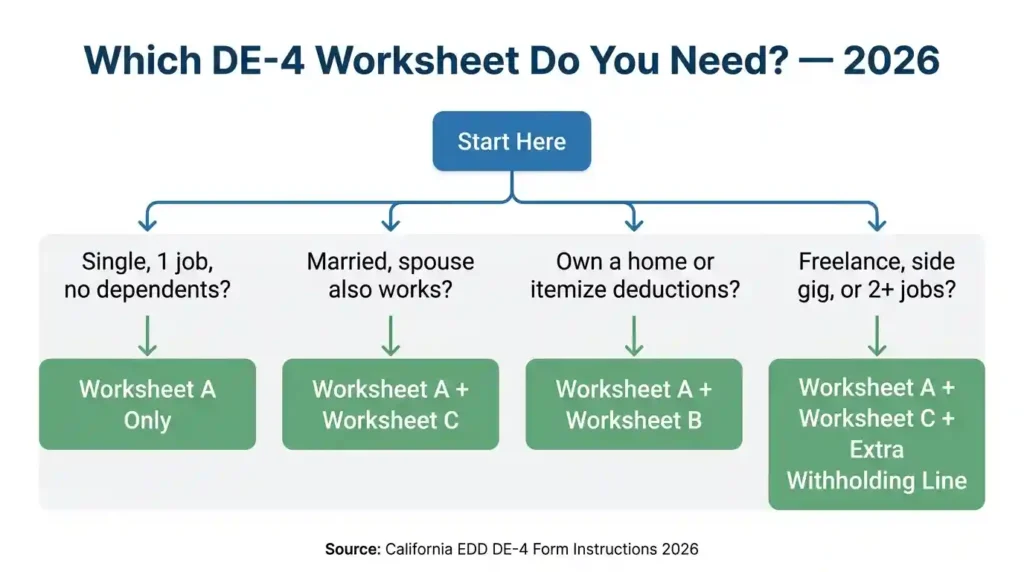
Takeaway: Most single employees with one job only need Worksheet A. Married or multi-income workers should check Worksheet C.
Before You Start: Gather These Items
Pull these together before you start. It takes two minutes and saves ten.
- Your full legal name and home address
- Your Social Security Number
- Your most recent tax return if you have one
- Names and dates of birth for any dependents
- A rough estimate of your annual income if you have multiple jobs or side income
Takeaway: Grab your Social Security Number and last tax return before you start. You will finish twice as fast.
Step-by-Step: How to Fill Out Your DE-4 Form
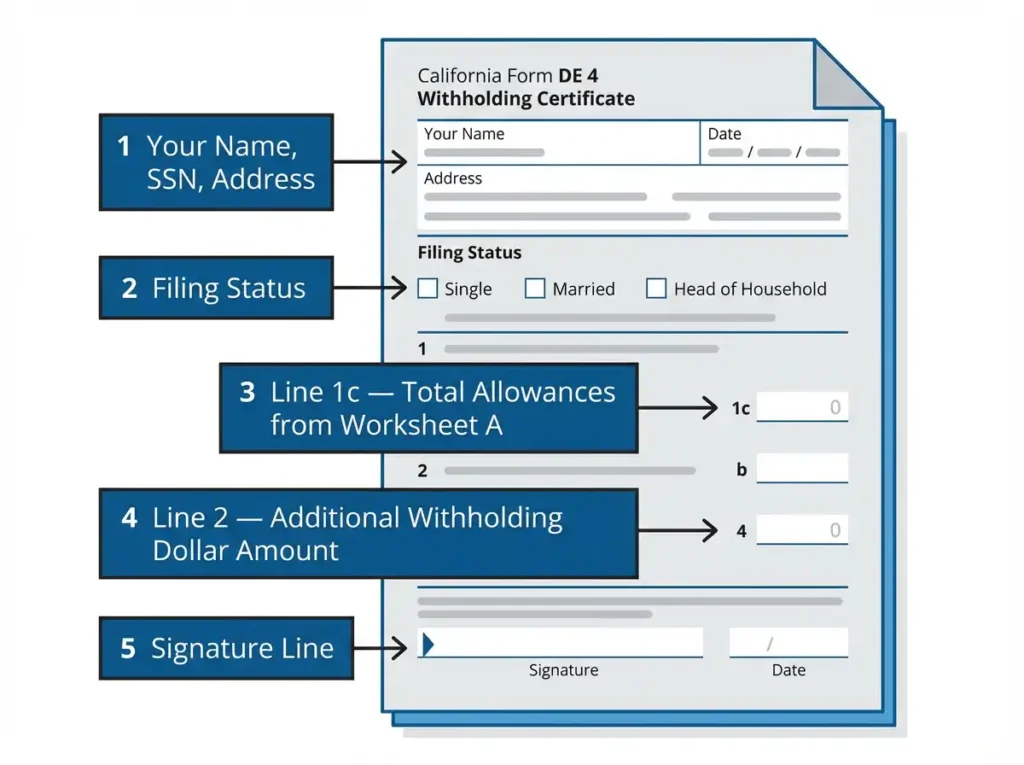
Step 1: Enter Your Personal Information
Write your full legal name exactly as it appears on your Social Security card. Add your home address, Social Security Number, and employer information if requested. Double-check your SSN before moving on. One wrong digit causes payroll delays that take weeks to fix.
Step 2: Select Your Filing Status
Your filing status sets your California tax rate. There are three options.
Single or Married Filing Separately (Two or More Incomes)
Choose this if you are single. Also choose this if you are married but both you and your spouse work. Two incomes in one household need more withholding to avoid a tax bill later.
Married (One Income)
Choose this only if you are married and your spouse does not work. This status allows for lower withholding because your household has one income to cover.
Head of Household
This status applies if you pay more than half the cost of keeping up a home for a qualifying person. A single parent raising a child usually qualifies.
Who Qualifies and Common Mistakes
A single parent who pays more than half the household costs qualifies. A person supporting an elderly parent in their home may also qualify. The most common error is claiming this status while splitting expenses equally with a roommate or partner. Check the IRS Head of Household definition and EDD definitions if you are unsure.
Takeaway: When in doubt between Single and Married, pick the option that matches your actual household income situation.
Step 3: Complete Worksheet A (Regular Withholding Allowances)
Worksheet A determines your allowance number. More allowances mean less tax withheld. Fewer mean more withheld. Here is how each line works.
Line A: Yourself
Claim one allowance for yourself if no one else claims you as a dependent. If your parents still claim you on their taxes, enter zero here.
Line B: Your Spouse
Claim one allowance for your spouse if you are married, you chose the “Married One Income” status, and your spouse does not work. Do not claim this if your spouse has their own job.
Line C: Blindness Allowance
You can claim an extra allowance if you are blind or your spouse is blind. This is a California-specific benefit that reduces your withholding.
Line D: Dependents
Claim one allowance for each qualifying dependent. For California purposes, a qualifying dependent is generally a child under 19, a full-time student under 24, or another person you financially support who meets California FTB dependency rules. Each dependent you add lowers your withholding a little. If you are unsure whether someone qualifies, check the California FTB dependent guidelines before claiming.
Line E: Total
Add up Lines A through D. Write that number here. This is your total allowance count. A single person with no dependents usually gets a total of 1. A married couple with two kids might get 4 or more.
Example Allowance Calculation
Here is what a typical Head of Household calculation looks like. Angela is single with two kids. She claims 1 for herself on Line A. She skips Line B because she has no spouse. She skips Line C because no blindness applies. She claims 2 on Line D for her two children. Her Line E total is 3. That is the number she writes on the main form.
Takeaway: Your total allowance number on Line E directly controls how much California tax comes out of your paycheck.
Step 4: Worksheet B (Estimated Deductions)
Most new employees skip this worksheet. Worksheet B is for people who plan to itemize deductions on their California return instead of taking the standard deduction. Not sure which is better for you? See how the California standard deduction for 2026 compares to itemizing before you decide. You might need it if you own a home, have large charitable donations, or significant medical expenses. If you are renting or new to the workforce, skip it.
Takeaway: Skip Worksheet B unless you own a home or have large itemized deductions. It does not apply to most new employees.
Step 5: Worksheet C (Additional Withholding)
Worksheet C handles situations where your main job’s withholding will not cover all the taxes you owe: multiple jobs, freelance income, or a dual-income household pushing into a higher bracket. If you are weighing whether to take freelance work as a contractor or employee, read our 1099 vs W-2 breakdown for California workers first — it changes how you fill this worksheet. It calculates the extra dollar amount to withhold per paycheck and feeds that number directly into the main form.
Takeaway: Worksheet C is your safety net if you have side income or multiple jobs. It prevents unwanted surprises at tax time.
Step 6: Additional Withholding Dollar Amount
After completing your worksheets, look for the line on the main form asking if you want extra money withheld each pay period. This is separate from your allowances. You enter a flat dollar amount here.
Some people add $20 extra per paycheck. Others add $50. I personally used this line when I had a side consulting gig. It saved me from owing $800 in April. If you want a bigger refund or you know you will have extra income, enter a number here.
Takeaway: Adding even $20 extra per paycheck can save you from an unexpected tax bill. Use this line if you have any income beyond your main job.
Step 7: Sign and Submit
Sign and date the form. An unsigned DE-4 is not valid and defaults you to Single with zero allowances. Submit to HR or your payroll portal before the cutoff date. Save a photo or PDF copy for yourself before handing it over.
Takeaway: Sign the form, submit it before the payroll cutoff, and always keep a copy for your own records.
Watch: How to Fill Out the California DE-4 Form (2026 Video Guide)
Before you dive into the written steps, watch this quick walkthrough. It covers every section of the DE-4 form in real time so you know exactly where to look and what to write.
Prefer to read? The full step-by-step written guide continues below.
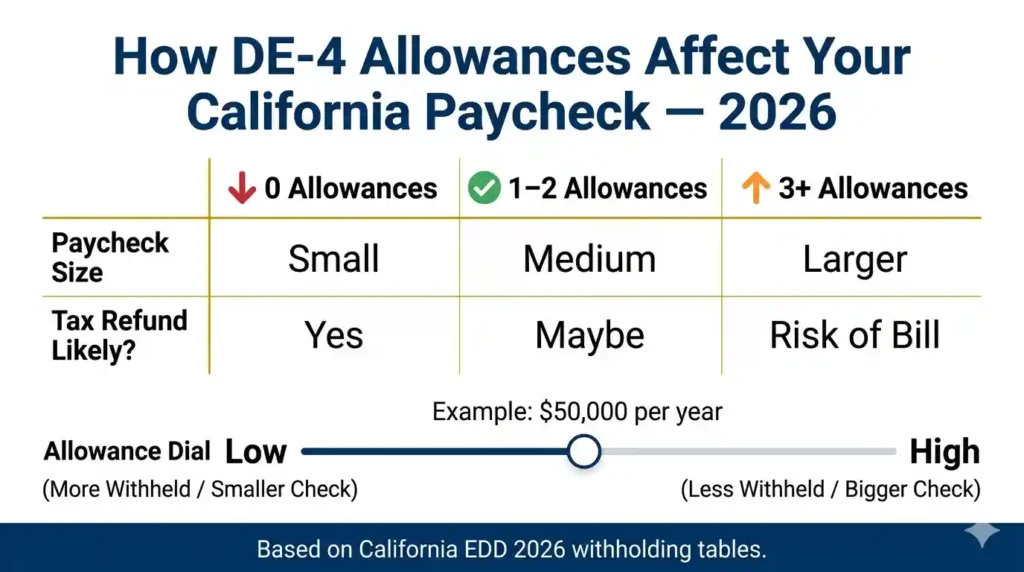
How Your Choices Affect Your Paycheck
More Allowances
More allowances mean less California tax withheld. Your take-home pay goes up. On a $50,000 salary, claiming 3 instead of 1 can mean roughly $30 to $60 more per paycheck depending on your pay frequency and California’s current withholding tables. The exact impact depends on which California income tax bracket for 2026 your income falls into. Claim too many and you may owe at tax time.
Fewer Allowances
Fewer allowances mean more tax withheld and smaller paychecks. Claiming zero on a $50,000 salary may mean $40 to $80 less per paycheck. If your paycheck already feels short, see our guide on why your California paycheck is so low before adjusting your allowances. You will likely get a California refund in spring. This is the safer route if your income varies.
Adding Extra Withholding
A flat dollar addition each paycheck is the most precise tool. Adding $20 adds $520 per year. Adding $50 adds $1,300. For two-job households, $50 extra at the primary job covers most shortfalls automatically.
Takeaway: Allowances are a dial. Turn it up for bigger paychecks. Turn it down for a bigger refund. Add extra dollars for precision.
Fast Real-Life Examples
First Job, Single, No Kids
Maria just started her first full-time job. She is single, has no dependents, and rents an apartment. She completes Worksheet A only. She claims 1 allowance for herself on Line A. Her total is 1. She skips Worksheets B and C. She signs and submits. Done in six minutes.
Married, One Income
David is married. His wife stays home with their two children. He selects “Married One Income” as his filing status. On Worksheet A, he claims 1 for himself, 1 for his spouse, and 1 for each child. His total allowance count is 4. He skips Worksheets B and C.
Married, Two Incomes
Jennifer and her husband both work. She selects “Single or Married with Two Incomes” as her filing status. She completes Worksheet A for herself only and claims 1. She then completes Worksheet C to estimate the extra withholding needed to cover their combined income. She adds $30 extra per paycheck.
Part-Time Job Plus a Side Gig
Carlos works part-time at a retail store and also does freelance graphic design. He selects Single status. He completes Worksheet A and claims 1. He then uses Worksheet C to estimate his freelance income and figures out he needs $45 extra withheld per paycheck to avoid a year-end bill. If you are in a similar situation, our part-time vs full-time paycheck comparison for California shows how withholding shifts between job types.
Head of Household With Dependents
Angela is a single mom with two kids. She qualifies as Head of Household. She selects that status on the form. She completes Worksheet A and claims 1 for herself plus 1 for each child, for a total of 3. She skips Worksheets B and C.
Takeaway: Your situation determines your path. Find the example above that looks most like your life and follow that exact pattern.
Can You Claim Exempt on the DE-4?
Some employees can skip withholding entirely by claiming “Exempt.” This is a specific legal status, not a preference.
Qualification Rules for Exempt Status
You can claim exempt only if two conditions are both true. First, you had zero California income tax liability last year. Second, you expect to have zero California tax liability again this year. Both must apply at the same time.
Who Usually Qualifies
Students working a summer job and earning below the California filing threshold often qualify. Very low-income part-time workers who fall below the minimum income required to file a California return may also qualify. Most full-time employees with a standard salary do not qualify for exempt status.
Annual Renewal Requirement
Exempt status does not carry over automatically. California requires you to file a new DE-4 each year to maintain exempt status. Many employers set a January or February deadline. Check with your HR department for the exact cutoff they use. If you miss it, your employer drops you back to the Single with zero allowances default until you resubmit.
Risks of Claiming Exempt Incorrectly
If you claim exempt when you do not qualify, you could owe a large California tax bill at the end of the year. The state may also charge penalties and interest on the unpaid amount. If you are unsure whether you qualify, claim zero allowances instead. It is the safer path. If you already overpaid and want to track your refund, check the California tax refund status for 2026.
Takeaway: Only claim exempt if you genuinely owed zero California tax last year and expect to owe zero again this year.
DE-4 vs. W-4: The Difference That Confuses Most Employees
This is the most common confusion I see. Copying your W-4 answers onto the DE-4 is a mistake.
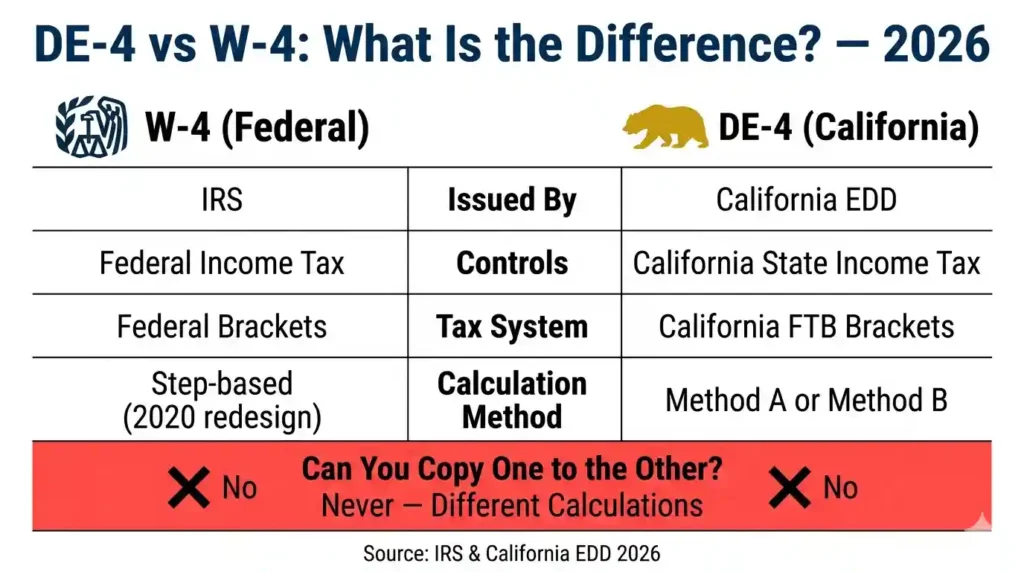
Federal Withholding: What the W-4 Does
The W-4 form is an IRS form that controls federal income tax withholding only. It has nothing to do with California.
California Withholding: What the DE-4 Does
The DE-4 is a California EDD form that controls state income tax withholding. California has its own brackets, its own standard deduction, and its own withholding tables. It does not use the federal W-4 system. California actually uses a separate exact calculation method — see how California Method B withholding works in 2026 to understand the math behind your deductions.
Why the Numbers Should Never Be Copied
The two systems use completely different calculations. Copying W-4 answers onto your DE-4 almost always causes under-withholding at the state level. Fill each form out independently from scratch.
Takeaway: Always fill out the DE-4 on its own terms. Never copy your W-4 answers directly onto it.
Reality Check: DE-4 Myths That Cause Mistakes
“I’ll Just Copy My W-4”
Federal and California taxes use different systems. What works on your W-4 is almost never right for your DE-4. Fill them out separately.
“More Allowances Means More Money Forever”
More allowances mean bigger paychecks now. But that money is still owed. Claim too many and you will pay it back at tax time, sometimes with a penalty.
“Leaving It Blank Is the Safer Choice”
Leaving the DE-4 blank defaults you to Single with zero allowances. That often means more tax withheld than necessary. Always submit a completed form.
“I Cannot Change It Once I Submit”
You can update your DE-4 at any time for any reason. There is no limit.
Takeaway: Fill it out yourself, claim the allowances that match your real life, and update it whenever your situation changes.
Payroll Insider Insights
What Happens If You Leave the DE-4 Blank
Your employer defaults you to Single with zero allowances. Your paychecks will be smaller than they need to be all year. You will likely get a refund in April but you paid for it month by month. Keep in mind that California SDI is also withheld regardless of your DE-4 — see the California SDI rate for 2026 to understand that separate deduction.
Why Your First Paycheck Sometimes Looks Wrong
Payroll runs on cycles. If you submit after the cutoff, your first check reflects the default rate. The correct amount kicks in the following cycle. Ask HR for the exact cutoff date and submit before it. Save a PDF copy of your completed form the moment you hand it in. If the numbers on your stub still look unfamiliar, our guide on how to read a California pay stub in 2026 explains every line.
Troubleshooting Guide
I Submitted Incorrect Information
Ask HR for a blank DE-4. Complete a new one with the correct information and resubmit. The corrected form takes effect in the next eligible payroll cycle. There is no penalty for submitting a corrected form.
My Withholding Is Too High
Your allowance count is probably too low. Submit a new DE-4 with a higher allowance number on Worksheet A. Also check if you accidentally added extra withholding on the additional dollar line.
My Withholding Is Too Low
Your allowance count is likely too high. Lower it on a new DE-4 submission. If you have side income or multiple jobs, also complete Worksheet C to add a flat extra amount per paycheck.
HR Rejected My Form
An HR rejection usually means a missing signature, an illegible Social Security Number, or an incomplete section. Ask which line triggered the rejection, fix only that part, and resubmit the corrected form.
Takeaway: Any mistake on the DE-4 is fixable. Submit a corrected form and the change takes effect at the next payroll cycle.
When You Should Update Your DE-4
Life changes mean your withholding should change too. Update your DE-4 when any of the following happens:
- You get married or divorced
- You have or adopt a child
- Your spouse starts or stops working
- You start a side business or freelance work
- Your income changes significantly
- You buy a home or stop itemizing deductions
Takeaway: Review your DE-4 any time your family size, job count, or home ownership status changes.
Official Resources and Guidance
The California EDD is the official source for the DE-4. Download the current form and instructions directly from the EDD DE-4 page. For employer-specific questions, contact your HR or payroll department. For personal tax situations, consult a CPA or enrolled agent. You can also browse all our California payroll tax guides for related topics including SDI, withholding methods, and paycheck deductions.
Important: This guide is for general informational purposes only. It is not legal or tax advice. Tax rules change each year. Always verify current DE-4 instructions at the EDD official website or with a licensed tax professional.
Takeaway: The EDD website at edd.ca.gov is your official starting point for the current DE-4 form and all instructions.
Deep-Dive FAQ
Is the DE-4 Required?
California employers are required to have employees complete the DE-4 for state withholding purposes. You should fill it out when you start a new job. If you do not, your employer uses the Single with zero allowances default. If you are new to California employment, our paycheck basics guides cover everything from gross pay to net pay deductions.
What Happens If I Leave It Blank?
Your employer treats you as Single with zero allowances. This is the highest withholding setting. You will likely overpay California taxes all year and get a refund when you file.
Can I Claim Zero Allowances?
Yes. Claiming zero allowances is a valid choice. It maximizes your withholding and typically leads to a refund. Some people prefer this as a way to avoid surprises. If you are a lower-income worker, also check whether you qualify for the California Earned Income Tax Credit in 2026 — it can significantly boost your refund.
Can I Update It Later?
Yes, at any time. There is no limit on how often you can submit a new DE-4. Changes take effect in the next payroll cycle after submission.
Should My W-4 and DE-4 Match?
No. They cover different tax systems. Fill out each form independently based on its own instructions.
How Many Allowances Should I Claim?
Complete Worksheet A and add up the lines that apply to your situation. That total is your allowance number. Most single workers claim 1. Most married workers with dependents claim 2 to 5.
What If I Have Two Jobs?
Use Worksheet C on the DE-4 at your primary job. Estimate the additional income from your second job and calculate how much extra should be withheld. You can also claim zero allowances at your second job to increase withholding there.
Can I File Online?
That depends on your employer. Many companies use digital HR portals where you can complete and submit the DE-4 electronically. Ask your HR department how they handle new hire paperwork.
Does Being a Dependent Change My DE-4?
Yes. If someone else claims you as a dependent on their tax return, you cannot claim yourself on Line A of Worksheet A. Enter zero on that line instead of 1. The IRS rules on who can be claimed as a dependent explain the full criteria if you need to verify your status.
When Does the Change Affect My Paycheck?
Changes take effect in the first full payroll cycle after HR processes your new form. Ask your payroll team for the cutoff date to know exactly which paycheck reflects your update.
Final Action Summary
Here is your checklist to finish the DE-4 today.
- Gather your SSN and last tax return
- Select your filing status
- Complete Worksheet A and total your allowances
- Complete Worksheet B only if you itemize deductions
- Complete Worksheet C only if you have side income or multiple jobs
- Add extra dollar withholding if needed
- Sign and date the form
- Submit before the payroll cutoff
- Save a copy for your records
- Verify your next paycheck reflects the change
Takeaway: Complete only the worksheets that apply to your life, sign the form, and submit it before the payroll cutoff. That is the whole job.
For more real-world salary situations, browse our California paycheck scenarios to see how different income types and family situations affect take-home pay.

Yeasin Sorker is the founder of Paycheck Calculator California. He built this tool in 2018 after noticing that most free paycheck calculators missed California-specific rules like daily overtime and the uncapped SDI rate.
He researches California payroll tax updates regularly and keeps this calculator aligned with the latest IRS, FTB, and EDD published rates. All calculations on this site are estimates based on official 2026 government sources. For personalized tax advice, consult a qualified tax professional.