
California Pay Data Reporting requires private employers with 100 or more employees to file annual pay and demographic data with the California Civil Rights Department (CRD). The deadline for Reporting Year 2025 is May 13, 2026.
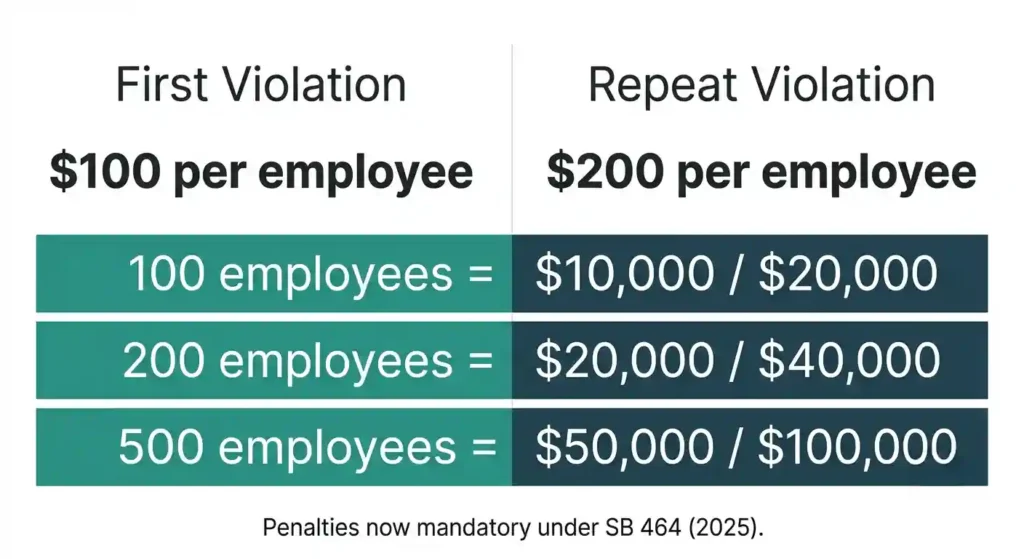
Senate Bill 464, signed in October 2025, made penalties mandatory. Miss the deadline and courts are now required to impose fines of $100 per employee on the first violation, $200 on a repeat. For a 500-employee company, that is up to $100,000 in exposure.
One important caveat: the 100-employee threshold is based on total nationwide headcount, not California headcount alone. Many out-of-state employers do not realize they are covered until it is too late.
California Pay Data Reporting at a Glance
Quick reference for covered employers:
- Who must file: Private employers with 100+ payroll employees and at least one California employee; or 100+ labor contractor workers with at least one in California
- Filing deadline: May 13, 2026 (Reporting Year 2025)
- Report types required: Payroll Employee Report and/or Labor Contractor Employee Report
- Key penalties: $100 per employee (first violation); $200 per employee (repeat), now mandatory under SB 464
What Is California Pay Data Reporting?
Why California Requires Pay Data Reporting
California wants to know whether workers are paid fairly across race, ethnicity, and sex. The CRD uses submitted data for compensation analytics and workforce analytics to spot patterns. If a company consistently places women or workers of color in lower pay bands, that shows up in the report. Pay data reporting sits alongside California’s pay transparency law framework, which requires pay ranges in job postings. Together, they give the state a clearer picture of wage equity.
The Laws Behind the Reporting Requirement
California Government Code section 12999 is the legal foundation. SB 973 (2020) introduced the Labor Contractor Employee Report. Senate Bill 1162 (2022) added mean and median hourly rates by race, ethnicity, and sex, and strengthened labor contractor obligations. SB 464 (2025) layered in mandatory penalties and new data fields.
How California Pay Data Reporting Differs From EEO-1 Reporting
These are separate filings. EEO-1 is federal, administered by the EEOC. California Pay Data Reporting is state-level, administered by the CRD. California requires W-2 pay bands, hours worked, mean and median hourly rates, exemption status, employment type, and weeks worked. The EEO-1 requires none of that. In 2026, the EEOC proposed rescinding EEO-1 entirely. Whatever happens federally, California’s obligation is unaffected.
Who Must File a California Pay Data Report?
The 100-Employee Threshold Explained
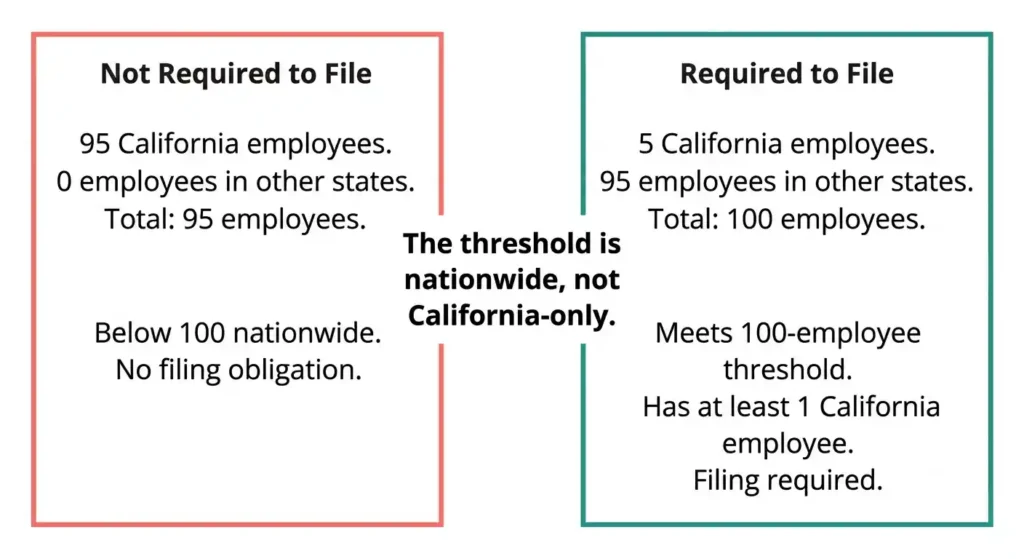
The threshold is based on nationwide workforce, not California headcount. Two hundred total employees with three in California still makes you a covered employer. Full-time, part-time, seasonal, temporary, and employees on leave all count. New hires count from their start date. Terminated employees count if they were on payroll at any point during 2025.
Employers Required to File
Any private employer with 100 or more payroll employees during 2025 and at least one California employee must file. This includes California-based companies, out-of-state companies with California operations, and employers whose entire California presence is remote workers.
Employers Not Required to File
Fewer than 100 total employees: exempt. Government employers: exempt. Zero California employees: exempt, even above 100 nationwide. One California employee with 100+ total employees: not exempt.
Quick Eligibility Checklist
Three questions. Did you have 100 or more payroll employees during 2025, including during your snapshot period? Did at least one work in California? Did you use 100 or more labor contractor workers with at least one in California? Yes to one and two: file a Payroll Employee Report. Yes to three: file a Labor Contractor Employee Report. Both can apply simultaneously.
Types of California Pay Data Reports
Payroll Employee Report
Covers direct hires on your payroll. Required data: race, ethnicity, sex, job category, W-2 Box 5 earnings, hours worked, pay band, and NAICS code. For 2025, also report mean and median hourly rates per job category, race, ethnicity, and sex combination. Three new mandatory fields: exemption status (exempt or non-exempt from minimum wage and overtime under California IWC wage orders and the FLSA), employment type (full-time, part-time, or intermittent), and weeks worked annually.
Labor Contractor Employee Report
Required when you used 100 or more contractor employees during 2025 with at least one in California. The labor contractor supplies compensation and hours data. You, as the client employer, submit the report. If a contractor fails to provide data, SB 464 allows courts to shift penalties to them. Your obligation remains regardless.
Key Differences Between Report Types
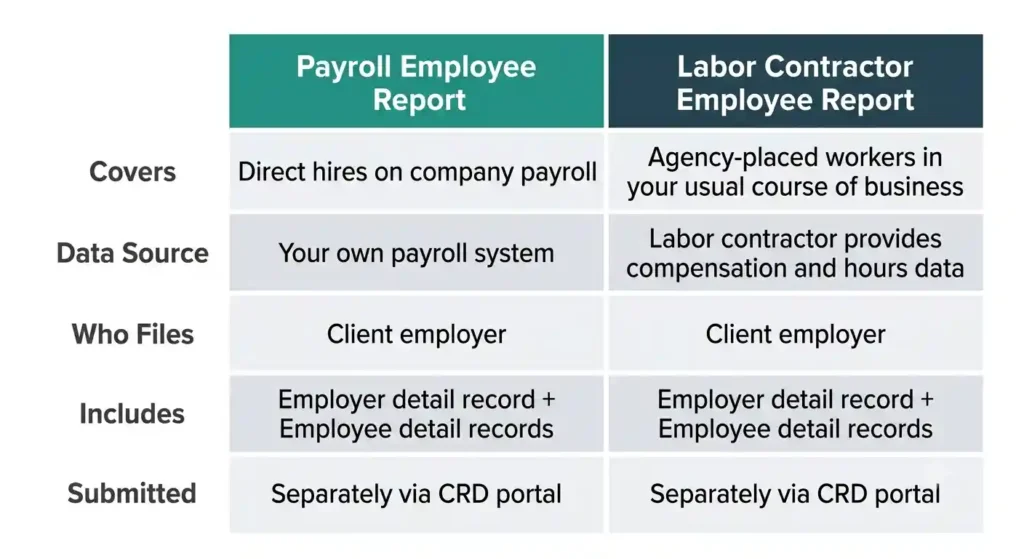
Payroll report covers internal workforce. Labor contractor report covers third-party workers in your usual course of business. Within each report, the CRD distinguishes employer detail records (company-level: establishment address, NAICS code) from employee detail records (individual-level: pay and demographics). Both go to the same portal, submitted separately with separate certification.
California Pay Data Reporting Deadline
Annual Filing Timeline
Deadline falls on the second Wednesday of May each year. For Reporting Year 2025: May 13, 2026. The snapshot period must fall between October 1 and December 31, 2025. All headcount, demographics, pay, and hours data come from that one chosen pay period. Use the California paycheck calculator to cross-check how pay band placements align with gross wages when preparing your data.
What Happens If You Miss the Deadline?
Courts are now required to impose penalties when CRD requests enforcement. The CRD can seek a court order compelling compliance and recover its costs. Penalties: $100 per employee (first violation), $200 per employee (subsequent). No grace period. No extensions. Good faith is no longer a valid defense under SB 464.
Step 1 — Determine Which Employees Must Be Included
California Employees
Include all employees who physically work in California, whether assigned to a California establishment, commuting to a California office, or primarily located in the state. Assignment follows where the work is performed, not where the company is registered.
Remote Employees
A remote employee, or teleworker, working from a California home is a California employee for reporting purposes. Assign remote workers without a physical establishment to the establishment that most closely manages their work, typically headquarters. Document the assignment logic.
Multi-State Employees
Assignment depends on primary work site. If California is where they spend most working time, they are a California employee. Occasional California work from a non-California primary location does not trigger inclusion. Be consistent and document your methodology.
Labor Contractor Workers
Include if you used 100 or more during 2025 with at least one in California. As the client employer, collect required data from the labor contractor and submit the report. Disclose each contractor’s name and federal employer identification number in the filing. For more on the distinction between employees and contractors, see the California ABC test guide and the 1099 vs W-2 comparison.
Step 2 — Select Your Snapshot Period
What Is a Snapshot Period?
A single pay period within October 1 to December 31 of the reporting year. Everyone on your payroll during that pay period is included. It is a moment in time, not an average.
Choosing the Right Snapshot Period
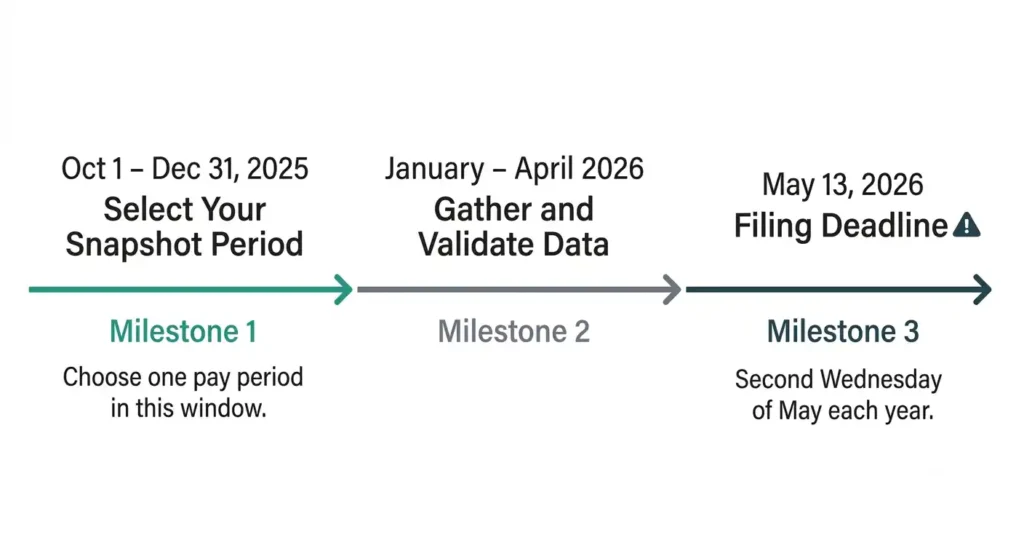
Pick a period that reflects your normal workforce. Avoid unusual headcount spikes, seasonal surges, or post-layoff dips. Most employers choose mid-October or early November before holiday staffing shifts. Document your selection rationale.
Step 3 — Gather Required Employee Data
Demographic Information
Report race, ethnicity, and sex for each snapshot employee. Race and ethnicity categories: White, Black or African American, Hispanic or Latino, Asian, Native Hawaiian or Other Pacific Islander, American Indian or Alaska Native, Two or More Races. The MENA category remains optional for 2025. Sex categories: Male, Female, Nonbinary, and “not specified” for those who decline to identify.
Compensation Information
Use W-2 Box 5 wages (Medicare wages and tips). Box 1 is permitted only if Box 5 is unavailable. The IRS W-2 instructions explain the distinction between Box 1 and Box 5 if your payroll team needs a reference. Place each employee’s total annual earnings into one of the Bureau of Labor Statistics pay bands (Band 1: under $19,239 through Band 12: $208,000 and above). Report which band, not the exact salary. To understand how gross wages flow into W-2 Box 5, see how to read a California pay stub.
Hours Worked Requirements
Report actual hours worked for the full reporting year, not the snapshot period. Non-exempt employees: use tracked hours. Exempt employees: 40 hours per week is the CRD-permitted default. Be consistent across your exempt population. For a breakdown of how California overtime laws affect hours tracking for non-exempt workers, that context matters here.
Mean and Median Hourly Rates
Divide each employee’s annual W-2 earnings by total annual hours worked. Group by job category, race, ethnicity, and sex. Calculate mean and median for each group. Single-person groups: that rate is both the mean and the median. Use annual hours, not snapshot hours. Your HRIS or payroll system may need custom configurations to export the right data combination. Platforms like Workday and ADP often require report-building before this step. Test exports early.
Step 4 — Organize Employees by Job Category
Understanding EEO Job Categories
For the 2025 cycle, California uses the same 10 EEO job categories as the federal EEO-1. Assign each employee to exactly one category based on actual job duties, not job titles. Top three: Executive/Senior Level Officials and Managers (CEOs, CFOs, VPs, directors), First/Mid-Level Officials and Managers (supervisors, team leads), and Professionals (engineers, attorneys, accountants requiring advanced field knowledge).
Technical and Operational Categories
Technicians: specialized work applying complex knowledge in healthcare, IT, or lab science. Sales Workers: primary function is selling. Administrative Support: clerical and office support roles.
Production and Service Categories
Craft Workers: skilled manual trades requiring apprenticeship. Operatives: production line or machine-intensive tasks. Laborers: unskilled manual work. Service Workers: personal, protective, or food service.
Common Classification Mistakes
Professionals vs. Technicians: a software engineer with a four-year degree is a Professional. A junior IT support tech with an associate’s degree or certification is a Technician. Manager over-classification is also common. The Manager category requires regularly directing others and authority to hire or influence hiring. Individual contributors misclassified as managers distort pay band distributions. Worker classification mistakes in pay data reporting can also signal broader worker misclassification risks worth reviewing.
Multi-Establishment Employer Reporting Rules
Single-Establishment Employers
One location, one report. Establishment identified by address and unique identifier. All workforce data rolls up under that record.
Multi-Establishment Employers
Each location gets its own section. Employees are assigned to where they physically work or are managed from. You cannot consolidate across locations. Each establishment needs its own employee count, job category breakdown, pay band data, and hourly rate calculations.
Headquarters and Remote Worker Assignment
Remote workers not tied to any physical establishment are assigned to the establishment managing their work, typically headquarters. Document this decision. Consistency across reporting cycles reduces CRD questions.
Real-World California Pay Data Reporting Scenarios
Employer With Exactly 100 Employees
Exactly 100 employees with at least one in California: filing required. No safe harbor at the threshold. A company that hires its 100th employee in November 2025 before its snapshot period is a covered employer for the 2025 Reporting Year.
Employer Using Multiple Staffing Agencies
Three agencies supplying a combined 110 California workers in 2025: Labor Contractor Employee Report required. Collect pay, demographic, hours, and job category data from each agency. List each contractor by name and FEIN. If an agency refuses to provide data, document it. SB 464 allows courts to apportion penalties to the contractor. Your obligation to file remains.
Company With Remote Workers Across States
Texas-based company, 120 employees nationwide, 12 working remotely from California homes: Payroll Employee Report required. Report only the 12 California-based employees. Assign them to Texas headquarters since there is no California office. Document the assignment.
Snapshot Examples
Single-location employer example
A Los Angeles marketing firm with 130 employees selects November 15, 2025 as its snapshot. On that date, 128 receive wages. Two are on unpaid leave with no wages. The 128 are included. The two on unpaid leave are excluded.
Multi-location employer example
A retailer with 300 employees across San Francisco (120), San Diego (100), and Sacramento (80), plus 20 unassigned remote workers. Three establishment records, one per location. The 20 remote workers are assigned to the San Francisco headquarters as the management hub.
California Pay Data Reporting Penalties
Failure-to-File Penalties
First violation: $100 per employee. Repeat: $200 per employee. A 200-employee company faces $20,000 on the first miss and $40,000 on a repeat. Courts are now required to impose penalties when CRD requests enforcement. No warning-only outcomes. This mandatory penalty structure mirrors the approach California takes with other payroll compliance reporting obligations — non-filing is treated as the most serious violation.
Inaccurate or Incomplete Reports
A rejected report not corrected before the deadline is treated as non-filed. The CRD has used pay data in prior enforcement actions on pay discrimination under California’s Equal Pay Act. Accurate reporting is a direct input into state enforcement.
Common Myths and Misconceptions
“Only California Employees Count”
California employees are what you report. But the 100-employee threshold is nationwide. A company with 95 California employees only is not required to file. A company with 5 California employees and 100 total is required to file.
“EEO-1 Filing Is Enough”
California’s report requires W-2 pay bands, hours worked, mean and median hourly rates, exemption status, employment type, and weeks worked. The EEO-1 requires none of that. In 2026, the EEOC proposed rescinding EEO-1 entirely. California’s obligation is independent and unchanged.
“Remote Workers Do Not Need To Be Reported”
California residents working from home are California employees. They are included in the snapshot, assigned to an establishment, and reported with full data. The law follows the employee, not the office.
“Contractors Are Never Included”
True 1099 independent contractors are generally excluded. But labor contractor employees placed by staffing agencies to perform work in your normal course of business trigger a separate filing obligation if you used 100 or more with at least one in California. If you are unsure whether a worker qualifies as an independent contractor under California law, the California ABC test is the right starting point.
Most Common Reporting Mistakes Employers Make
Employee Count Errors
Most common: counting only California employees toward the 100-employee threshold. The threshold is nationwide. Part-time and temporary employees count. True independent contractors do not.
Snapshot Period Errors
Selecting a period outside October-to-December is an automatic error. Selecting a period with unusual headcount distorts your data. Choose a period reflecting normal operations.
Labor Contractor Reporting Mistakes
Forgetting to file a Labor Contractor Employee Report is the costliest oversight. Track contractor headcount throughout the year, not just at filing time.
Pay Data Classification Errors
Wrong pay bands usually result from using annualized salary instead of actual W-2 Box 5 earnings, or snapshot hours instead of annual hours. Incorrect job categories distort pay equity data. Missing hours worked is the most common reason CRD rejects a submission. Review California payroll taxes to make sure your underlying payroll data — including SDI and withholding records — is clean before you pull it into the report. The California EDD is the authority on SDI and UI contributions that appear in those records.
Step 5 — Submit the Report to the California Civil Rights Department
Creating a CRD Account
Register at the CRD’s pay data reporting portal before filing. Each user needs their own login. The portal supports multiple users under one employer account. If you filed previously, log in early to confirm access before the filing window opens.
Filing Methods
Three options: direct online entry, Excel template upload, or CSV upload formatted to CRD specifications. For large or complex workforces, Excel or CSV is more efficient and less error-prone. Download the current cycle’s templates. Using last year’s version causes submission errors.
Certification Requirements
An authorized officer must certify the report before submission. This certifying official is attesting to accuracy under SB 464’s enforcement framework. Identify the certifying official early and give them time for a final review before the deadline.
California Pay Data Reporting Compliance Checklist
Before the Snapshot Period
In September, confirm you meet the 100-employee threshold. Verify your payroll system captures all three new 2025 fields: exemption status, employment type, and weeks worked annually. If using labor contractors, begin data collection procedures with each agency. Also confirm compliance with California sick leave laws and meal and rest break requirements — hours worked data tied to those obligations feeds directly into your pay data report.
Before Filing
Validate data against CRD template requirements. Review job category assignments, pay band placements, and hourly rate calculations. Confirm mean and median calculations use annual hours. Payroll team owns data extraction. HR team owns demographic accuracy and classification. Legal or compliance team reviews the final report. Certifying official signs off before upload.
After Submission
Retain submitted report and CRD confirmation of receipt. Keep this compliance documentation for a minimum of two years per CRD guidance, or longer per your legal counsel given California wage claim timelines. Build internal controls into your annual HR calendar. Start next year’s process in September.
Frequently Asked Questions
Do remote employees count toward the reporting threshold?
Yes. A remote employee working from California counts toward both the threshold and the California reporting requirement.
Do out-of-state employees count?
Out-of-state employees count toward the 100-employee threshold. Only California employees are included in the actual report.
What is the snapshot period?
A single pay period you select between October 1 and December 31 of the reporting year. For 2025: October 1 to December 31, 2025.
What if employee counts fluctuate throughout the year?
Coverage is based on whether you had 100 or more employees during 2025, including during your snapshot period. Crossed the threshold briefly: you are a covered employer.
Do independent contractors count?
True 1099 contractors do not count. Labor contractor employees placed by staffing agencies may count and can trigger a separate report if you used 100 or more with at least one in California. See the full 1099 vs W-2 breakdown for how the classification difference affects tax and reporting obligations.
What is the difference between payroll and labor contractor reports?
Payroll report covers your direct hires. Labor contractor report covers agency-placed workers. Both require the same demographic and compensation data. Both go to the CRD portal. Submitted separately.
What happens if I submit inaccurate data?
CRD can reject deficient reports. Inaccuracies after acceptance can trigger enforcement action. The CRD has used pay data in prior pay discrimination investigations.
Can I correct a report after filing?
Yes, contact the CRD. But correcting after the deadline does not protect from late-filing penalties if the original submission was incomplete or rejected.
How are multi-location employers supposed to report employees?
Each physical establishment is reported separately. Remote workers without a location are assigned to the establishment managing their work, typically headquarters.
What records should employers retain after filing?
Submitted report, CRD confirmation, underlying workforce data, and documentation of snapshot period selection and employee assignment decisions. Minimum two years per CRD guidance; longer recommended by most employment attorneys.
What happens after the CRD receives my report?
CRD reviews for completeness and technical accuracy. Accepted reports are added to the CRD’s pay equity dataset for research and enforcement. Reports with errors may be rejected. A rejected report not corrected before the deadline is treated as a failure to file.
What if my company was acquired, merged, or spun off during the reporting year?
No blanket exemption for corporate changes. Acquired companies: the surviving entity generally takes on the reporting obligation. Spin-offs: each resulting entity assesses its own threshold and obligation independently. Evaluate each situation against Government Code section 12999 with legal counsel.
Should we handle this internally or work with an outside compliance provider?
Companies with clean HRIS systems and experienced payroll staff can often file internally. Companies with fragmented data, multiple payroll systems, or complex contractor relationships often benefit from an HR compliance vendor or employment law firm. Weigh internal capacity against mandatory penalty exposure before deciding.
Final Takeaway for Employers
Determine whether filing is required
Start with total nationwide headcount. 100 or more employees with at least one in California: file a Payroll Employee Report. 100 or more labor contractor workers with at least one in California: file a Labor Contractor Employee Report as well. The California labor laws category covers the full range of employer obligations that overlap with this reporting requirement.
Collect the correct data early
Three new mandatory 2025 fields: exemption status, employment type, and weeks worked annually. In 2027, job categories expand from 10 EEO categories to 23 SOC categories. Build flexible data infrastructure now. If your team is also managing CalSavers mandate compliance or SB 294 workplace notice requirements, coordinate those data pulls alongside pay data reporting prep to avoid duplicate effort.
Validate reports before submission
Do not upload the first version. Check every required field, verify annual-hours denominators, and have a second reviewer confirm the file before it goes to the portal.
Build a repeatable annual compliance process
Calendar it. Assign it. Start in September. The CRD is expanding this program, and the employers who handle it cleanly are the ones who treat it as a standing obligation, not a spring scramble. For all ongoing payroll compliance reporting obligations in California, building one unified annual compliance calendar is the most efficient way to stay ahead.

Yeasin Sorker is the founder of Paycheck Calculator California. He built this tool in 2018 after noticing that most free paycheck calculators missed California-specific rules like daily overtime and the uncapped SDI rate.
He researches California payroll tax updates regularly and keeps this calculator aligned with the latest IRS, FTB, and EDD published rates. All calculations on this site are estimates based on official 2026 government sources. For personalized tax advice, consult a qualified tax professional.