
🛡️ Verified Retirement Compliance Audit:
By a Senior Payroll Auditor | 8+ Years in California Labor Standards. At Paycheck Calculator California, our 2026 research team monitors the SB 1126 expansion and CalSavers registration mandates. We verify the automatic 5% deduction rates and opt-out procedures to ensure your retirement contributions are calculated accurately under the 2026 state requirements.
The California retirement mandate requires every employer with at least one W-2 employee to register for CalSavers or certify a qualifying plan. The Franchise Tax Board began full enforcement on January 1, 2026, with fines reaching $750 per employee.
In eight years of helping small business owners through compliance, I watched a San Diego restaurant owner absorb a $3,000 fine because she missed this exact rule. CalSavers carries a 0.35% employee expense ratio and costs employers nothing to facilitate. Your only obligation is to process California payroll deductions on your employees’ behalf.
CalSavers works for fast, free compliance. But its $7,500 annual contribution cap limits talent attraction compared to a 401(k).
START HERE: Your Two Choices Right Now
You have exactly two legal options.
Option 1: Register for CalSavers at calsavers.com and facilitate payroll deductions for your employees.
Option 2: Certify that you already offer a qualifying retirement plan. This includes a 401(k), SEP IRA, SIMPLE IRA, 403(b), or 401(a) plan.
That is it. There is no third option. There is no “wait and see.” Ignoring state notices is the single most expensive mistake I see small business owners make.
Takeaway: Register or certify. Do it today. Every day you wait costs you money.
Quick Decision Flow: Which Path Is Right for You?
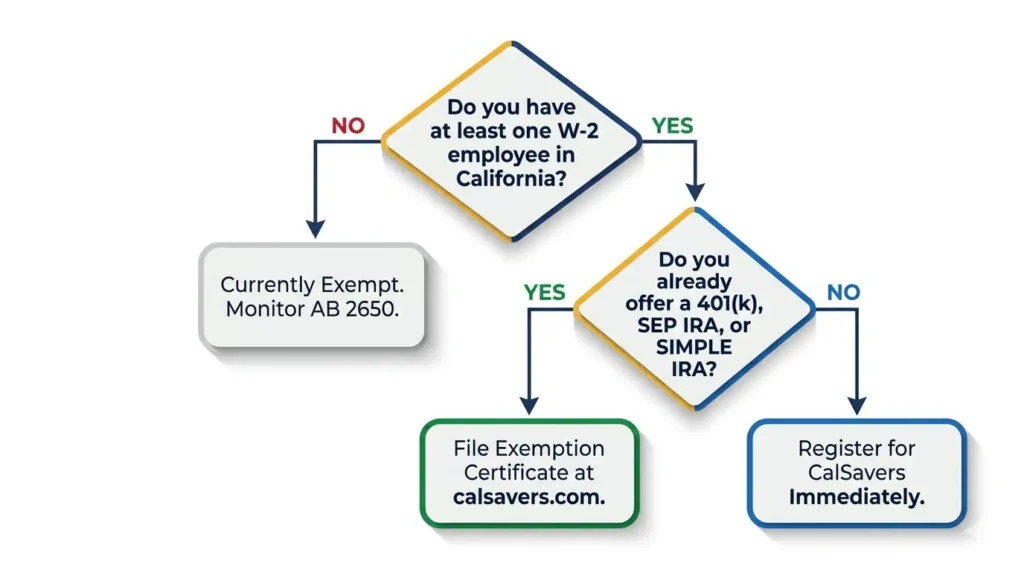
Do you currently offer a 401(k), SEP IRA, or SIMPLE IRA with active enrollment?
- YES → File your exemption certificate at calsavers.com. You are done.
- NO → Register for CalSavers immediately. Enrollment takes under one hour.
Do you have at least one W-2 employee aged 18 or older in California?
- YES → The mandate applies to you right now.
- NO (owner-only, sole proprietor) → You are currently exempt. Monitor AB 2650 for changes.
What Is the CalSavers Mandate and Why Does It Exist?
CalSavers is a state-mandated retirement savings program created under the CalSavers Retirement Savings Trust Act. It is administered by the CalSavers Retirement Savings Board and backed by the California State Treasurer’s Office.
The program is designed for wealth gap mitigation and financial inclusion. Millions of California workers had zero access to any tax-advantaged savings vehicle through their job. The state created CalSavers to fix that. Each participating employee gets a Roth IRA account managed through Ascensus and invested by State Street Global Advisors in Target Retirement Funds.
Here is the part that surprises most business owners. You do not contribute a single dollar. Employers are legally prohibited from making contributions to CalSavers. Your only job is to register, upload your employee roster, and process payroll deductions. You carry zero fiduciary liability.
Takeaway: CalSavers is a payroll-deposit IRA facilitated by you. You are the middleman, not the funder.
Who Must Comply in 2026 (Including Edge Cases Competitors Ignore)
Direct Answer: Any California business with at least one W-2 employee aged 18 or older must comply with the CalSavers mandate, effective January 1, 2026, regardless of business size, industry, or how many hours that employee works.
The Standard Rule
Any person or entity doing business in California that employs at least one eligible employee must comply. This was codified through Senate Bill 1126 (SB 1126), signed into law on August 26, 2022.
Eligible employees include:
- W-2 employees aged 18 or older
- Part-time workers
- Seasonal or temporary staff
- Employees who work as little as one hour per month
The 30-day eligibility rule applies. Any new hire who meets the Age 18+ Requirement must be added to your employee roster within 30 days of their hire date.
Who Is Exempt
Not every business has to participate. You are exempt if you are a:
- Sole proprietor with no employees
- Government, tribal, or religious organization
- Business already offering a qualifying retirement plan with active enrollment
If you qualify, you must actively file an exemption certificate through the CalSavers online employer portal. Qualifying but not certifying is treated the same as non-compliance.
Edge Cases That Most Guides Skip
This is where I see real confusion in the field. Here are the situations that catch business owners off guard.
Remote employee living in California. If your employee lives in California, you must comply. It does not matter where your business is incorporated or headquartered. The employee’s residence controls the mandate.
Employee works minimal hours. Even one hour per month triggers the mandate. There is no minimum-hours threshold under SB 1126.
Your business grows mid-year. The mandate triggers dynamically. If you hire your first employee in June, your compliance clock starts immediately.
You close your existing retirement plan. You must switch employees to CalSavers right away. You cannot have a gap in coverage.
Takeaway: If you have one California W-2 employee, you are almost certainly covered by this mandate.
The Penalty Timeline (With Real Math for a 4-Employee Business)
The Franchise Tax Board enforces all penalties. This is not a private agency. This is the state of California coming directly for your bank account. If you have ever wondered how much California actually takes from each paycheck, the penalty math here will put it in sharp perspective.
Here is exactly how the penalty structure works:
| Compliance Status | Penalty Per Employee | Timeline From Notice |
| Initial Non-Compliance | $250 | 90 days after notice |
| Continued Non-Compliance | +$500 | 180 days after notice |
| Cumulative Total | $750 | 6 months after notice |
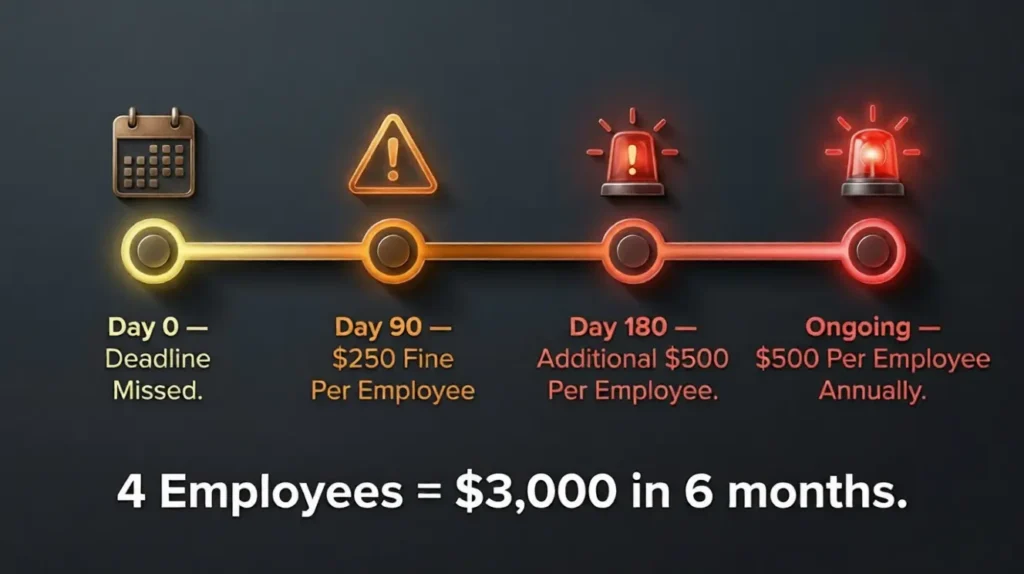
For a business with four employees, the math is brutal.
Total penalty = (4 x $250) + (4 x $500) = $3,000
That is a $3,000 hit for not registering a free program. I have seen owners try to fight these notices. The appeals process is slow and rarely successful if you simply failed to act. I have sat with owners at their kitchen tables, laptop open, reading these notices out loud. The look on their faces when the math hits them is something I never want you to experience.
One more thing the table above does not show. The FTB confirms that after the 180-day mark, the $500 per employee penalty continues to be issued annually until you reach full compliance. This is not a one-time cap. The longer you wait, the deeper the hole gets.
Takeaway: Four employees plus six months of ignoring notices equals a $3,000 fine from the FTB.
CalSavers vs. 401(k) vs. SEP IRA: The Honest Comparison
Most business owners ask me the same question. “Should I just set up my own plan instead?” The answer depends entirely on your goals.
| Feature | CalSavers (Roth IRA) | 401(k) | SEP IRA |
| Employer Cost | $0 | $$ to $$$$ | $ |
| Employer Contribution | Not allowed | Optional | Discretionary (varies by year) |
| 2026 Employee Contribution Limit | $7,500 ($8,600 if 50+) | $24,500 base ($32,500 if 50-59 or 64+; up to $35,750 if 60-63) | Varies |
| Employee Expense Ratio | 0.35% | Varies | Varies |
| Setup Complexity | Low | High | Medium |
| Fiduciary Liability | None | Yes | Limited |
| Talent Attraction Value | Low | High | Medium |
| Mandatory Participation | Opt-out (automatic enrollment) | Opt-in | Opt-in |

The 2026 contribution limits tell the real story. A CalSavers Roth IRA caps out at $7,500 per year for workers under 50. A traditional 401(k) allows up to $24,500 as a base limit, and $32,500 for workers aged 50 to 59 or 64 and older, with an even higher $35,750 available for workers aged 60 to 63 under the SECURE 2.0 super catch-up rules. That gap matters enormously if you are trying to attract competitive talent or if you are a higher-earning business owner. Pre-tax 401(k) contributions also reduce your California taxable income dollar for dollar, which is worth modeling before you decide which path to take.
Also, Section 45E of the tax code and the SECURE 2.0 Act provide meaningful tax credits for small businesses that launch a new private retirement plan. Employers with 1 to 50 employees can claim 100% of qualified startup costs up to $5,000 per year for three years. On top of that, a separate employer contributions credit can offset up to $1,000 per eligible employee per year for up to five years, for employees earning under $100,000 annually. To see how these credits interact with your California income tax bracket for 2026, run the numbers before you make a final plan decision. Consult a CPA or ERISA advisor to calculate your specific credit eligibility.
Takeaway: CalSavers is free and fast. A 401(k) costs more but attracts better talent and offers higher contribution caps.
How CalSavers Actually Works for Your Employees
Direct Answer: Your employee is automatically enrolled 30 days after hire at a 5% payroll deduction rate. They can opt out anytime. Their Roth IRA account belongs to them permanently, even after they leave your company.
When you register and upload your employee roster, here is what happens automatically.
Each eligible employee is auto-enrolled after 30 days on the job unless they opt out. Mandatory participation is the default, but opting out is always their right. They can do it anytime through the online employer portal at calsavers.com.
The default contribution starts at a 5% Initial Contribution Rate. Every year, it increases by 1% Annual Auto-increase until it hits the 8% Contribution Ceiling. Employees can change their rate or opt out at any point.
Accounts belong to the employee. Portability is one of CalSavers’s strongest features. The Roth IRA account follows the worker, not the job. When they leave your company, they take their account with them.
The $1,100 Catch-up Limit applies for workers aged 50 and above, on top of the standard $7,500 Annual Limit.
Takeaway: Employees are auto-enrolled at 5%, escalate to 8% over time, and own their accounts forever.
Missed the Deadline? Here Is Your Emergency Recovery Plan
I get calls from panicked owners every week. Here is exactly what I tell them.
Step 1: Go to calsavers.com immediately. Do not wait until tomorrow.
Step 2: Gather your Employer Identification Number (EIN) and your California payroll tax ID number.
Step 3: Request your Access Code. CalSavers mails this to the address on file with the Employment Development Department (EDD).
Step 4: Upload your employee roster using the CSV Upload Interface. You need each employee’s Social Security Number, date of birth, and contact details.
Step 5: Activate payroll deductions for each enrolled employee starting with your next payroll cycle.
THE EXCLUSIVE FIX: Why the CalSavers Portal Says “Record Not Found” (And the 10-Minute Solution)
This is the one problem that shuts down more registrations than anything else. And almost no major guide explains it.
Here is what happens. The CalSavers system does not pull your business data from the IRS. It syncs directly with Q3 and Q4 DE9C quarterly payroll filings from the California Employment Development Department (EDD). If your business did not run active payroll in those quarters, or if you filed late, the system has no record of you. You are invisible to the portal.
The fix takes about 10 minutes. Log into the EDD’s e-Services for Business portal and submit a zero payroll return for the missing quarter. You report $0 in wages. That is it. The EDD transmits that filing to CalSavers within a few business days. Once it syncs, your company record becomes visible and your Access Code request goes through immediately.
I have used this fix for clients from solo consultants to small retailers. It works every time.
Takeaway: “Record Not Found” means the EDD has no recent filing for you. A $0 payroll return fixes it in days.
Your Exact Employer Responsibilities Under the Law
The mandate is what I call “facilitative.” You are a helper, not a funder. Here is exactly what the law requires you to do.
You must:
- Register with CalSavers or certify an exemption
- Upload an accurate employee roster within 30 days of hire
- Process payroll deductions each payroll cycle via ACH debit facilitation
- Add new hires continuously as they become eligible
- Maintain records for potential audit purposes
You do not have to:
- Contribute any money to employee accounts
- Make investment decisions
- Manage the account in any way
- Bear any fiduciary liability
If your payroll provider is ADP or Gusto, check for their built-in payroll integration with CalSavers. Gusto and several other platforms have a direct API connection to the system that automates the employee roster updates. This turns a monthly administrative burden into a background process you barely notice. While you are auditing your payroll setup, it is also worth confirming you are aligned with the current California minimum wage for 2026, since both obligations run through the same payroll system.
Takeaway: Your job is to register, upload employees, and process deductions. Nothing else is required.
Myths vs. Facts: The Misinformation That Gets Owners Fined
I see these myths repeated constantly in Reddit forums and small business Facebook groups. Let me kill them right now.
Myth: “I only have one employee, so I am exempt.” Fact: One eligible W-2 employee means you are fully subject to the mandate.
Myth: “CalSavers is a scam. The mailer is phishing.” Fact: CalSavers is a legitimate state program. The official website is calsavers.com. The support number is (855) 650-6916. Mailers come from the California State Treasurer’s Office. Employee assets are held by a private trust managed by the CalSavers Retirement Savings Board.
Myth: “My employee already has their own IRA, so I do not need to enroll them.” Fact: A personal IRA does not exempt you from the mandate. You must still enroll them and offer opt-out participation.
Myth: “This costs my business money.” Fact: The $0 Employer Fee is real. There are no account maintenance fees charged to the business. The 0.35% Employee Expense Ratio is deducted from the employee’s account balance, not your payroll.
Takeaway: CalSavers is legitimate, free for employers, and mandatory even for one-employee businesses.
What Is Coming Next: AB 2650 and the Future of the Mandate
The California retirement mandate is not a static law. Our legislative tracking confirms that Assembly Bill 2650 (AB 2650) is currently in assembly committee as of early 2026. It proposes two significant changes.
First, it would expand the definition of “eligible employer” to include household employers. This affects nannies, personal assistants, and in-home care workers. If AB 2650 passes, these employers will face the same compliance obligations that larger businesses already navigate, alongside other evolving rules like California’s pay transparency requirements for 2026.
Second, it would cap automatic escalation at 10% of salary. The current 8% Contribution Ceiling would move to 10% under this proposal.
For small business owners, this means the compliance cycle continues. Treating your CalSavers setup as a “set it and forget it” system is not wise. You need to track legislative updates, especially if you employ household or domestic workers.
Takeaway: AB 2650 could expand the mandate to household employers. Stay informed and revisit your compliance setup annually.
What I Got Wrong the First Time (And What It Taught Me)
When SB 1126 first passed in 2022, I advised a client with three employees to wait. I told him the enforcement timeline gave him runway. That was a mistake. His access code never arrived because he had not filed a Q4 DE9C return that year. By the time we untangled it, he was already 60 days past his window and facing a notice from the FTB.
That experience changed how I approach this mandate. I now tell every client to register the same week they learn about the requirement. Not the same month. The same week. The access code delay alone can cost you 10 to 14 business days. That is time you do not have once the FTB clock starts.
One of my clients, a two-person cleaning business in Fresno, told me after we sorted her registration: “I thought this was going to be a nightmare. You walked me through it in 45 minutes and I have not had to think about it since.” That is exactly the outcome every small business owner deserves.
Takeaway: Early registration beats perfect timing. File now, adjust later.
Your 24-Hour Compliance Checklist
Use this right now. Print it. Post it on your wall.
- [ ] Confirm you have at least one W-2 employee in California
- [ ] Decide: Register for CalSavers OR certify a qualifying retirement plan
- [ ] Gather your EIN and CA payroll tax ID
- [ ] Request your CalSavers Access Code at calsavers.com
- [ ] If you get a “Record Not Found” error, file a zero return with the EDD
- [ ] Upload your employee roster via the CSV Upload Interface
- [ ] Activate payroll deductions starting next payroll cycle
- [ ] Add new hires within 30 days of their start date
- [ ] Save your registration confirmation for audit protection
- [ ] Review AB 2650 updates quarterly to stay ahead of changes
Frequently Asked Questions
Do I need to comply with CalSavers if I have only one employee?
Yes. The mandate applies to any California employer with at least one eligible W-2 employee aged 18 or older.
What is the CalSavers registration deadline?
The final deadline was December 31, 2025. Full enforcement by the Franchise Tax Board began January 1, 2026.
What happens if I do not comply with CalSavers?
The FTB issues a penalty of $250 per employee 90 days after notice. If you remain non-compliant, an additional $500 per employee is added at 180 days. Total exposure is $750 per employee.
Can I avoid CalSavers by offering my own retirement plan?
Yes. Offering a qualifying plan such as a 401(k), SEP IRA, or SIMPLE IRA exempts you. You must file an exemption certificate through the CalSavers portal to document this.
Do employers have to contribute money to CalSavers?
No. Employers are actually prohibited from contributing. Your role is facilitation only.
Are employees required to participate?
No. Employees are auto-enrolled under the mandatory participation default but can choose opt-out participation at any time.
How does the state know if my business must comply?
CalSavers cross-references DE9C filings with the EDD to identify employers with active W-2 payroll. Your payroll tax filings are their source of truth. This is the same system that tracks your California SDI obligations and employer UI contributions each quarter.
What do I need to register for CalSavers?
You need your EIN or TIN, your California payroll tax number, and the Access Code mailed by the state.
How long does it take to set up CalSavers?
Most employers complete registration in under one hour. Uploading the employee roster takes another 15 to 30 minutes depending on your employee count.
What if my employee already has their own IRA?
It does not matter. You must still enroll them. They can opt out immediately after enrollment if they choose.
The information in this post is for educational purposes. Consult a licensed ERISA attorney or CPA for advice specific to your business situation.

Yeasin Sorker is the founder of Paycheck Calculator California. He built this tool in 2018 after noticing that most free paycheck calculators missed California-specific rules like daily overtime and the uncapped SDI rate.
He researches California payroll tax updates regularly and keeps this calculator aligned with the latest IRS, FTB, and EDD published rates. All calculations on this site are estimates based on official 2026 government sources. For personalized tax advice, consult a qualified tax professional.