
You filed your California return weeks ago. Your bank account still hasn’t moved. Here’s the direct answer: check your status at ftb.ca.gov/refund, not the IRS refund tracker, which only covers your federal return. E-filed returns typically get processed in 3 to 4 weeks, paper returns can take up to 3 months. One caveat worth knowing: if a return gets flagged for identity verification, the status won’t move until the taxpayer responds to the FTB’s mailed letter.
Check Your California Refund Status Now
Go to ftb.ca.gov/refund, the official Franchise Tax Board tool run out of Sacramento. No account needed. Enter your details and you’ll see your status in seconds. Prefer your phone? The FTB Mobile App does the same check. The tracker updates daily, usually overnight, so checking it five times a day won’t help. Want to know what your refund should look like before the FTB even finishes processing it? Run your numbers through the California paycheck calculator and compare that against what you filed.
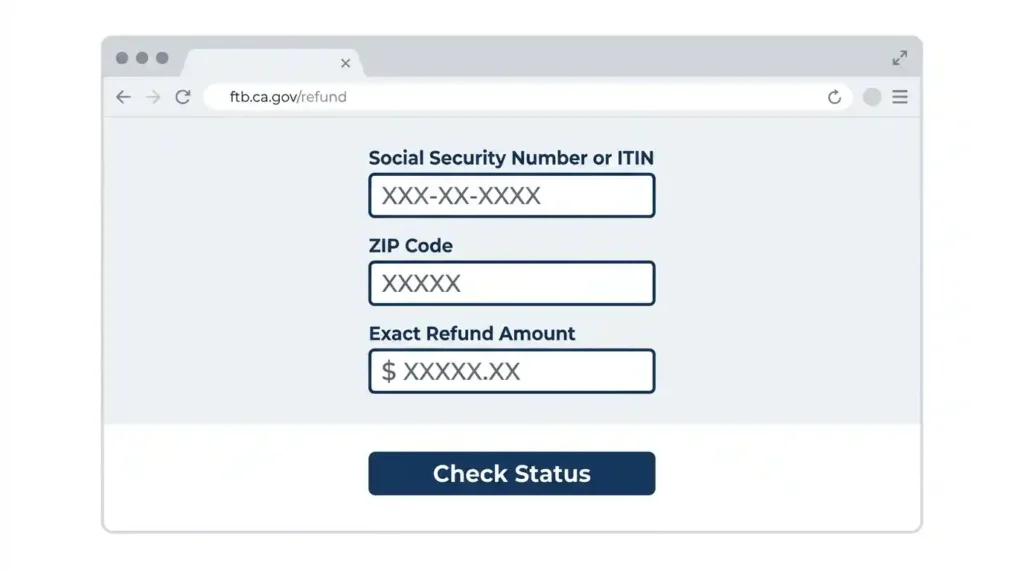
Information Needed to Check Your Refund
You need three things: your Social Security number or ITIN, the ZIP Code on your return, and the exact refund amount from your Form 540, the California Resident Income Tax Return, or Form 540 2EZ. Married filing jointly, use the SSN listed first. Filed yourself or through a tax professional, the same three details work either way. Round numbers won’t work, the system checks against your actual return. If you’re not sure where that refund figure even came from, our guide on how to read a California pay stub breaks down every withholding line that feeds into it.
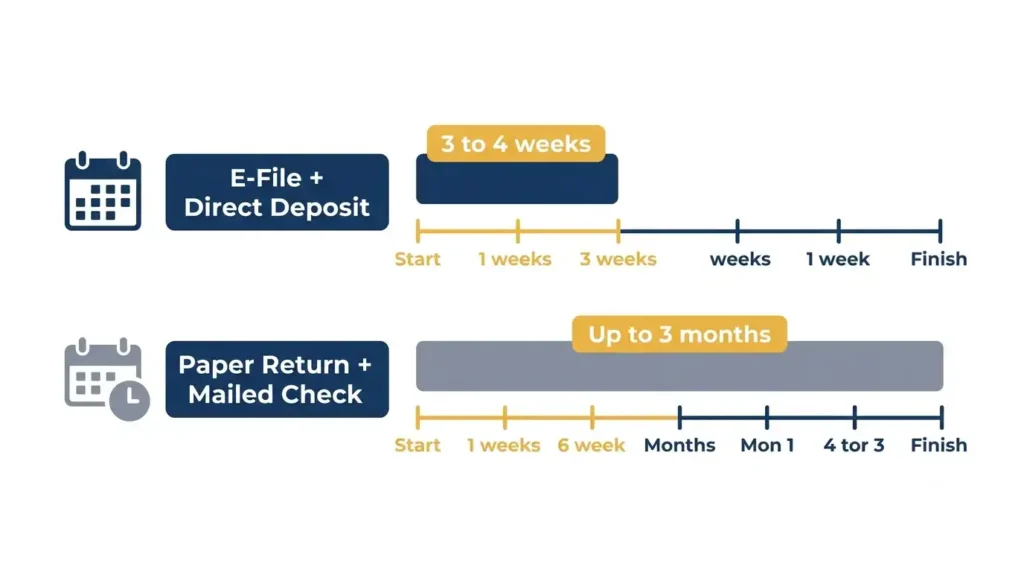
California Refund Status Quick Comparison
E-filed returns move faster than paper ones. E-file plus direct deposit is your fastest option. Paper returns and mailed checks can trail by months. Inside the normal window, wait. Past it, act.
What Is Where’s My Refund California and How Does It Work?
It’s a status tracker pulling from the FTB’s internal processing system. Your return showing “accepted” in TurboTax or H&R Block only means it reached the FTB’s servers, not that your refund is coming. Don’t confuse the FTB with the California Department of Tax and Fee Administration, which handles sales and use tax, not income tax refunds. For the bigger picture on how the state handles what comes out of your paycheck all year, our California payroll taxes hub covers it.
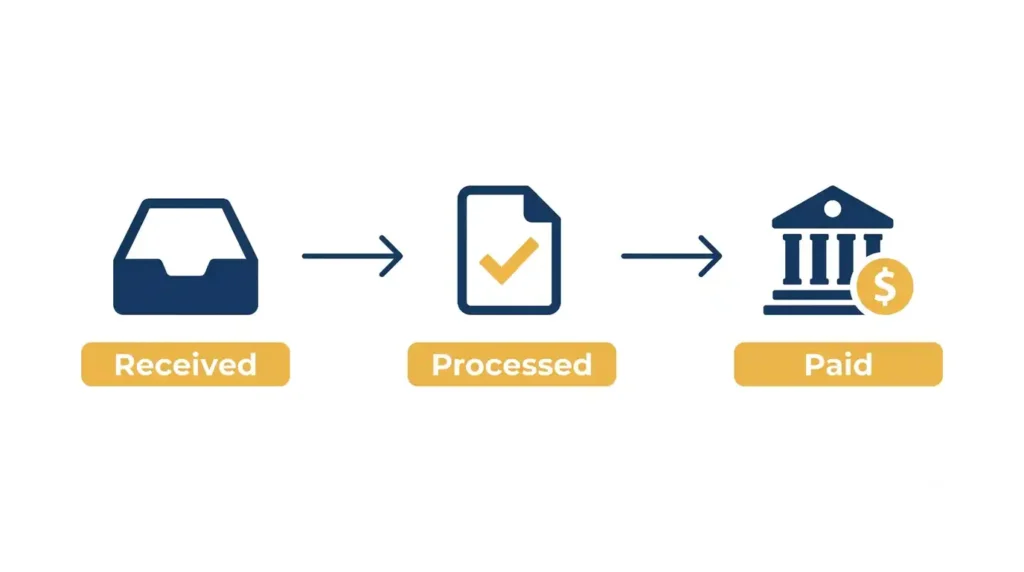
California Refund Tracking Process Explained
Your return moves through three stages: received, processed, paid. Received means the FTB has it. Processed means they’ve reviewed it and calculated your refund. Paid means the money left their system, by direct deposit or mailed check.
California Refund Status Messages Explained
“Refund in process” means normal review, no action needed. “Refund issued” means payment already went out. Messages about identity verification or additional review do require a response.
How Long Does a California Tax Refund Take in 2026?
That gap between e-file and paper filing explains most of the confusion around this topic. Two neighbors filing the same week can see refunds land a month apart just based on how they filed.
California E-File Refund Timeline
E-file plus direct deposit: expect your refund in 3 to 4 weeks. During peak season, February through April, add a small buffer. A mailed check from an e-filed return takes a bit longer for printing and postal delivery.
California Paper Return Refund Timeline
Paper returns are keyed in manually, which adds weeks. Up to 3 months is normal, not a red flag. Mailed during peak season pushes toward the longer end. E-filing next year is the real fix.
Why Is My California Refund Delayed?
Delays trace back to specific causes, not bad luck. Either something in your return triggered a closer look, or you’re still inside a normal processing window that feels longer than it is. Worth noting, a delayed refund and a small regular paycheck are two different problems. If it’s the second one bothering you, why your paycheck is so low is a separate withholding question worth sorting out too.
Common Reasons California Holds Refunds
Identity verification letters are the top cause. California runs an aggressive fraud detection program, and a flagged return means a mailed letter you must answer by the stated deadline. Claiming the California Earned Income Tax Credit adds extra scrutiny too, often another week or two. W-2 or 1099 mismatches trigger holds when reported income doesn’t match what employers sent the FTB. Self-employed and pay quarterly? See the California self-employment tax rate for how those payments feed into your final number. Outstanding balances, like unpaid LLC fees or prior tax debt, can hold or reduce a refund. Nonresident and part-year returns, Form 540NR, the California Nonresident or Part-Year Resident Income Tax Return, take longer due to extra income checks.
Refund Delayed After Tax Software Shows Accepted
“Accepted” in your software only confirms the FTB received your file, not that they’ve reviewed it. Expect a gap of days, sometimes weeks, before that shows up on the tracker. Past a few weeks with zero movement, check again or call.
California Refund Problems and Solutions
Most refund problems fall into three buckets: can’t find it, amount changed, or issued but never arrived. Each has a specific fix.
My California Refund Status Cannot Be Found
Filed within the last few days? Normal, give e-filed returns at least a week. Double check your ZIP Code and refund amount match your filed return exactly. Past 4 weeks with nothing showing, call the FTB at 1-800-852-5711, Monday through Friday, 8 a.m. to 5 p.m. Pacific.
My California Refund Amount Changed
The FTB adjusts refunds for math errors, disallowed credits, incorrect use of the California standard deduction, or debt offsets. Often the root cause traces back further than the return itself, to how your California DE-4 form or federal W-4 was filled out, since those set how much got withheld all year. You’ll get a written notice, a Notice of Tax Return Change, explaining exactly what changed. Read it before assuming an error. Most adjustments are small and tied to something specific on your return.
My Refund Says Issued But I Have Not Received It
Direct deposits usually land within 2 business days of “issued.” Mailed checks can take a couple weeks depending on location. A rejected direct deposit, from a closed or wrong account, gets reissued as a paper check, which resets the clock.
Real California Refund Scenarios Taxpayers Face
Here’s how the most common situations actually play out.
Filed Electronically but Refund Still Shows Processing
The most common message people see, and usually nothing to worry about. Inside the 3 to 4 week window, that’s exactly where you should be. Check back in a few days, not every hour.
Tax Software Says Accepted but FTB Shows No Refund
Give it a week. The two systems don’t sync instantly. Still nothing after a full week, check your entry details or call.
Refund Issued but Bank Account Has No Deposit
Banks can take one to two business days to post it after the FTB releases it. Longer than that, confirm the account and routing number on your return match your actual bank account information. Typos here are common on returns filed in a hurry. You can’t update bank details after filing, so a closed account bounces the deposit back and the FTB reissues it as a mailed check.
Special California Refund Situations and Exceptions
A few situations, including refunds intercepted for prior year or amended-return activity, need different handling.
Checking Previous Year California Refunds
The online tracker only shows current year activity. For prior years, use a MyFTB account or call the FTB directly. California gives you a 4 year window to claim an old refund before it becomes state property. Amended returns don’t show in this tracker either, and they run on a separate timeline that typically takes months, not weeks.
Refund Reduced Because of Government Debt
Owe the state, another government agency, or have court ordered debt like back child support or unpaid vehicle registration? The FTB can offset your refund to cover it. You’ll get a notice showing the original amount, what was deducted, and where it went. It’s not optional and can’t be reversed once applied.
Lost, Damaged, or Expired California Refund Checks
California refund checks are valid for six months from the issue date. Lost, damaged, or never arrived, request a replacement by filing a Replacement Warrant Claim. The FTB cancels the original and issues a new one, which adds processing time. Moved after filing? Update your address with the FTB, since a mailed check follows the address on file, not your new one.
California Refund Myths and Common Mistakes
Unnecessary stress often comes from believing things that simply aren’t true.
“Tax Return Accepted Means Refund Is Approved”
Acceptance means your return made it into the system. Approval comes after review, payment after that. Three separate steps.
“No Refund Update Means My Return Was Rejected”
A quiet tracker usually means normal processing, not rejection. A true rejection would show up in your tax software immediately, long before the FTB tracker matters.
“Calling FTB Immediately Will Make My Refund Faster”
Calling before your window passes won’t speed anything up. Reps can’t push your return ahead of others. Save the call for when you’re past the normal timeline or dealing with a specific letter.
What To Do After Checking Your California Refund Status
Your next move depends on the status you’re seeing.
If Your Refund Is Processing
Wait. Keep your filed return and confirmation number handy. Check back every few days, not constantly.
If Your Refund Is Delayed
Gather your return, any FTB letters, and your bank details. Past the standard window, call 1-800-852-5711 with that ready.
If Your Refund Has Been Issued
Confirm your bank details match your return. Direct deposits take a couple business days, mailed checks a couple weeks. Weekends and bank holidays can push a deposit back a day or two, and the FTB doesn’t pay out on a fixed schedule. Still nothing after that, contact the FTB about a reissue.
Frequently Asked Questions About Where’s My Refund California
How do I check my California refund status?
Visit ftb.ca.gov/refund and enter your SSN or ITIN, ZIP Code, and exact refund amount. No account required.
How long does a California refund take?
E-filed returns typically take 3 to 4 weeks. Paper returns can take up to 3 months, especially during peak filing season.
Why is my California refund still processing?
Usually just means you’re inside the normal review window. Identity checks, income mismatches, or outstanding balances can extend it.
Why can’t I find my California refund online?
A detail may be entered incorrectly, or your return is too recent to appear. Give e-filed returns at least a week before assuming a real problem.
Can I check my California refund without a MyFTB account?
Yes. The basic tracker at ftb.ca.gov/refund doesn’t require a login. A MyFTB account adds detail like notices and full filing history.
Is California refund faster with direct deposit?
Yes, consistently faster than a mailed check, often by one to two weeks once issued.
Key Takeaways About Checking Your California Refund
Check your status at ftb.ca.gov/refund with your SSN, ZIP Code, and exact refund amount. E-filed returns move in 3 to 4 weeks, paper returns in up to 3 months. Most delays are normal, not red flags. Save the phone call for when you’re actually past your processing window.

Yeasin Sorker is the founder of Paycheck Calculator California. He built this tool in 2018 after noticing that most free paycheck calculators missed California-specific rules like daily overtime and the uncapped SDI rate.
He researches California payroll tax updates regularly and keeps this calculator aligned with the latest IRS, FTB, and EDD published rates. All calculations on this site are estimates based on official 2026 government sources. For personalized tax advice, consult a qualified tax professional.